

Currently Empty: $0.00




Why Scratch Is the Perfect First Coding Language for Kids
Let’s be honest: teaching kids to code can feel overwhelming. Should they start with Python? JavaScript? Something easier? Something fun? Something educational?
The answer is simple: start with Scratch.
Scratch is the perfect blend of fun, creativity, storytelling, and logic, all wrapped inside a drag-and-drop coding tool built specifically for kids by MIT. Kids don’t just “take lessons” — they make games, stories, animations, and even interactive quizzes right from day one.
Scratch is more than a coding tool. It’s a playground for young creators.
Coding made visual, friendly, and fun
Instead of typing code and dealing with errors, kids snap colorful blocks together like digital LEGO pieces. No semicolons, no syntax drama, no confusion — just ideas turning into real, moving projects.
Why Scratch beats traditional text-based languages
Children stay motivated because:
- They see their ideas come alive instantly
- They express themselves through characters, stories, and games
- They explore logic without feeling intimidated
Scratch removes the fear that usually comes with coding and replaces it with excitement.
What Exactly Is Scratch?
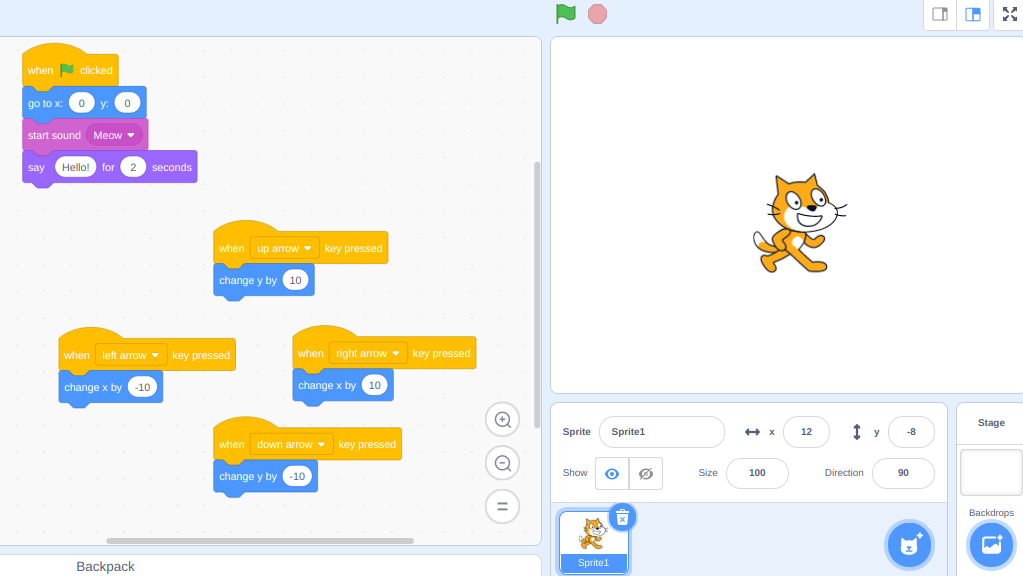
Scratch is a free online platform where kids can create animations, games, and stories using visual code blocks.
The story behind Scratch
Developed at the MIT Media Lab, Scratch was built to help children think like programmers without needing to memorize complicated syntax.
Drag-and-drop blocks explained
Kids can drag blocks like:
- Move 10 steps
- When clicked
- Change color
- Repeat 10 times
- If touching sprite
Blocks snap together like puzzle pieces so kids can see how programs “flow”.
Scratch vs. ScratchJr
- ScratchJr (ages 5–7)
Very simple blocks, no reading required. - Scratch (ages 7+)
Full environment with variables, messages, events, and more.
Why Kids Should Learn Scratch Before Any Other Language
Builds problem-solving and computational thinking
Scratch teaches kids:
- How to break problems down
- How to sequence instructions
- How to debug when something doesn’t work
No typing barriers
Kids don’t need:
- Perfect spelling
- Understanding of syntax
- Speed or accuracy on a keyboard
Instant feedback = instant motivation
In Scratch, kids see immediate results. This keeps them engaged and curious.
Recommended Ages for Scratch
Ages 5–7 → ScratchJr basics
Perfect for creating stories with simple movements and sounds.
Ages 7–12 → Scratch foundation
Kids can build:
- Games
- Animations
- Music projects
- Interactive quizzes
Teens → Real coding logic
Teens can create simulations, AI-style games, and full presentations.
Core Scratch Concepts Kids Can Learn Easily
Sequencing
Putting actions in the right order.
Loops
Repeating instructions forever or a certain number of times.
Conditionals
“If this happens, then do that.”
Variables
For storing scores, names, or changing values.
Events
“Start when green flag clicked”, “Start when key pressed”.
Sprites and backdrops
Characters = sprites
Scene = backdrop
These concepts directly map to Python and JavaScript later.
Step-by-Step: How to Get Started With Scratch
Creating an account
It’s free. A parent or teacher can set up a supervised account.
Understanding the interface
Left → Code blocks
Middle → Coding area
Right → Stage view
Bottom → Sprites list
Adding and controlling sprites
Kids love picking characters — cats, robots, dinosaurs, or custom drawings.
Using motion, looks, and sound blocks
Kids can:
- Move
- Dance
- Talk
- Change colors
- Play sounds
- Switch costumes
Instant fun, instant learning.
The Best Beginner Projects for Kids
Project 1 – Make a character dance
Use loops + costumes.
Project 2 – Build a mini game
Catch-the-fruit, avoid-the-monster, click-the-sprite — simple, fun learning.
Project 3 – Create an animated story
Kids design:
- Characters
- Dialogue
- Backgrounds
- Movements
Project 4 – Build a quiz project
Kids create questions and track score with variables.
Scratch for Parents Who Don’t Code
No background needed
If you can drag and drop blocks, you can help your child learn Scratch.
Ask guiding questions
- “What do you want your character to do next?”
- “Why isn’t it moving?”
- “What block could help here?”
Celebrate creativity
There’s no “wrong project”. Creativity > perfection.
Scratch for Teachers and Clubs
Integrating Scratch into the classroom
Use Scratch in:
- English (create stories)
- Math (build quizzes)
- Science (simulate experiments)
- Arts (animations, music)
Project rubrics
Score based on:
- Creativity
- Code organization
- Functionality
- Presentation
Group roles
- Designer
- Coder
- Tester
- Presenter
Common Mistakes Kids Make (And How to Fix Them)
Scripts not connecting
A block won’t work unless it’s attached properly.
Wrong event blocks
Kids forget to start with “When green flag clicked”.
Too many messy blocks
Teach them to separate scripts and label them with comments.
How Scratch Builds the Foundation for Python & Advanced Coding
Mapping Scratch to Python
Scratch blocks → Python commands:
- Move 10 steps → change x position
- Repeat → loop
- If touching → if statements
Moving from visual code to written logic
Kids who master Scratch transition into text-based coding smoothly.
Keeping Kids Motivated With Scratch
Join the Scratch community
Kids share and remix projects safely.
Remixing projects
Kids learn by exploring what others built.
Participating in challenges
Weekly community challenges are great for motivation.
Safety Tips for Using Scratch Online
Child-friendly controls
Turn off unnecessary messaging.
Avoiding chat issues
Monitor comments and set boundaries.
Healthy boundaries
Screen time should be balanced with creativity.
Scratch Is the Best Start to a Lifelong Coding Journey
Scratch isn’t just a platform — it’s a launchpad for creativity, problem-solving, and real computer science thinking. Whether your child is 7 or 12, Scratch gives them a friendly world where ideas come alive instantly.
With each project, they’re learning to think logically, experiment bravely, and express themselves confidently.
Scratch builds skills that last a lifetime — and it does it with fun.
FAQs About Scratch Coding for Kids
FAQ 1: Do kids need experience before using Scratch?
No. Scratch is designed for total beginners.
FAQ 2: Is Scratch free?
Yes — completely free, built by MIT.
FAQ 3: Can Scratch help kids learn real coding?
Absolutely. Scratch concepts map directly to Python, JavaScript, and more.
FAQ 4: How long should kids spend on Scratch?
20–30 minutes per session is ideal for beginners.
FAQ 5: Can Scratch be used in schools or clubs?
Yes, it’s perfect for STEM clubs, classrooms, camps, and robotics groups.