Currently Empty: $0.00




Why Coding Kits Are Exploding in Popularity in 2026
Parents aren’t just buying “toys” anymore—they’re investing in skill-builders that sneak in logic, creativity, and problem-solving.
Today’s coding kits meet kids at every stage: some use physical blocks (no reading required), others use app-based block coding, and the most advanced introduce Python and hardware tinkering.
That means you can start with zero screen time and naturally grow into real programming.
From Screen-Free Play to Python—meeting every child where they are
“Coding” isn’t one thing.
For early learners, it’s sequencing, patterns, and cause-and-effect.
For grade-schoolers, it’s loops, events, and variables.
For tweens, it’s robots you can customize and devices you can wire up.
The best kits in 2026 offer clear progression—from unplugged to Scratch-style blocks to Python.
What “beginner-friendly” really means for ages 4–14
Beginner-friendly doesn’t mean “too easy.” It means low frustration, fast wins, and room to grow.
Look for guided challenges, lots of projects, and optional expansions. Kits that scale with your child save money and keep motivation high.
Quick Picks by Age & Learning Style
Ages 4–7: Screen-Free & Tangible
- Matatalab Coding Set: Physical coding blocks guide a cute robot—perfect for pre-readers.
- Thames & Kosmos Kids First Coding & Robotics: Story-based lessons teach sequencing and loops—no devices required.
- Botley 2.0: A budget-friendly, screen-free robot that supports long code sequences and playful modes.
Ages 6–10: App-Guided & Block Coding
- Wonder Workshop Dash: Scratch-style apps and challenges; grows from driving to JavaScript.
Ages 8–12: Maker Kits & Robotics
- micro:bit + ELECFREAKS Tinker Kit: Sensors, LEDs, and breadboarding—ideal for curious builders; supports block coding and more.
- Makeblock mBot Neo / mBot2: Robust robot with Scratch now, Python later; designed for hands-on projects.
Ages 10–14: Text Coding & Expandable Robots
- LEGO Education SPIKE Prime: Middle-school LEGO robotics with Scratch & Python and tons of engineering challenges.
- Sphero RVR+: An open, hackable robot car—use Scratch/Python and add third-party hardware as skills grow.
The 2026 Winners: Detailed Reviews
Matatalab Coding Set (Best Screen-Free Starter, Ages 4–9)
Why parents love it: Matatalab uses tangible coding blocks—kids arrange them on a board to send the robot on adventures. It’s screenless and word-free, so even pre-readers can succeed. Parents praise the gentle learning curve and the way it turns coding into a tabletop game.
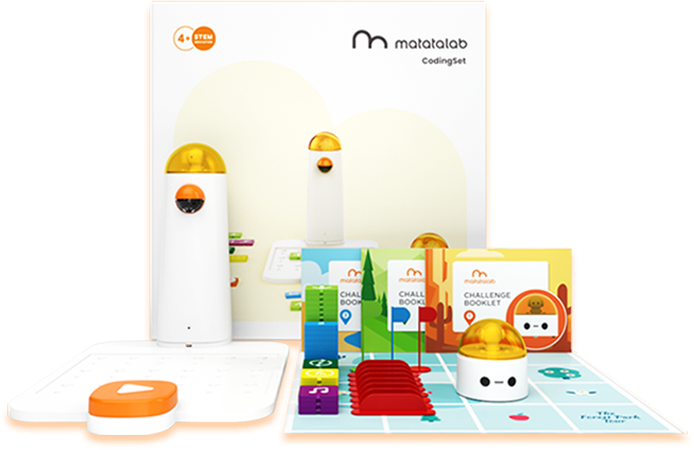
Skills kids actually learn: Sequencing, debugging, directional logic, and early math concepts. The set scaffolds challenges and offers creative add-ons (music/drawing) to keep momentum high as kids grow.
Thames & Kosmos Kids First Coding & Robotics (Best Story-Based Unplugged, Ages 4–8)
What’s in the box: A kid-friendly robot plus a 64-page manual with 30 lessons that teach loops, events, conditionals, functions, and variables—without any apps. The stories (mazes, soccer, and more) make abstract ideas concrete.
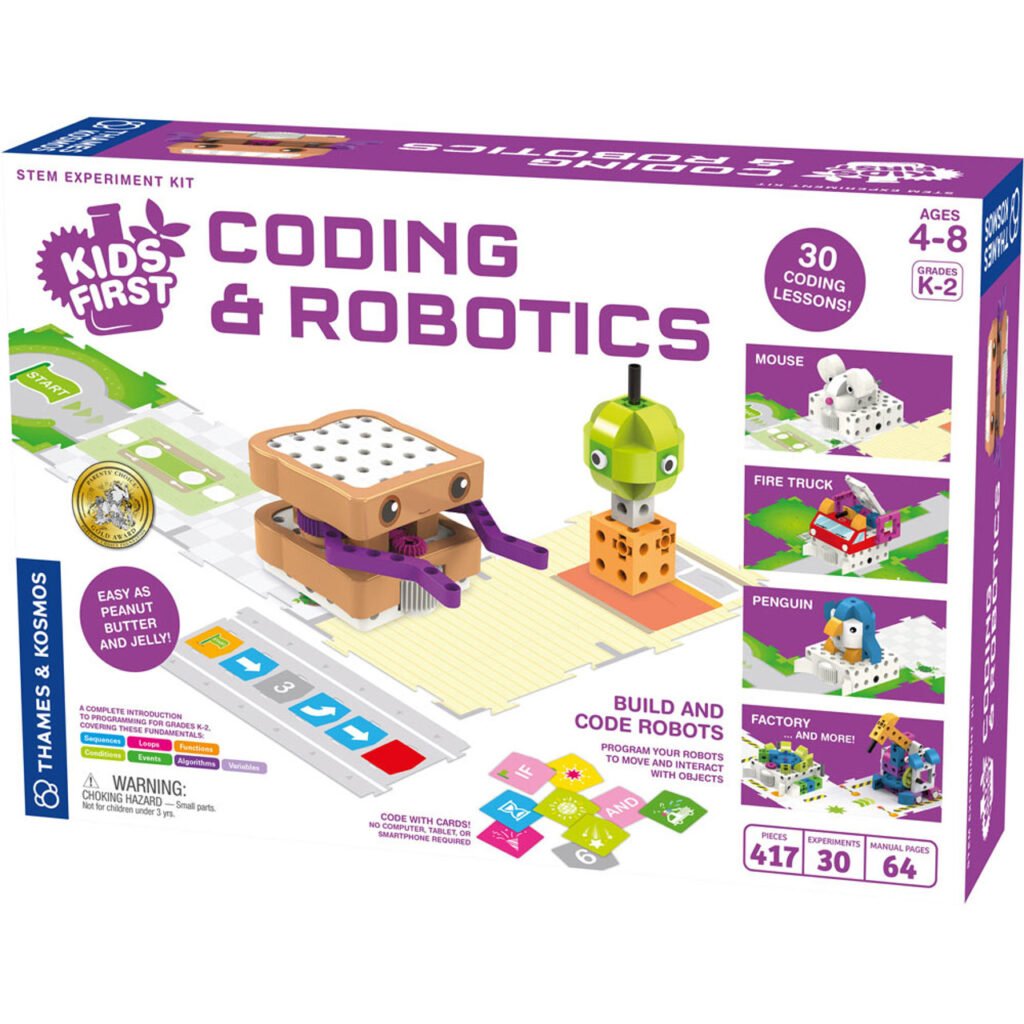
Learning curve & replay value: Because it’s unplugged, setup is fast and focus stays on thinking, not screens. It’s fantastic for siblings in the K–2 range and for families who want guided activities on rainy days.
Learning Resources Botley 2.0 (Best Budget Screen-Free Robot, Ages 5+)
Code without a tablet: Botley is a 100% screen-free robot that supports coding in six directions, light shows, fun interactions, and sequences up to 150 steps—great for building patience and planning.
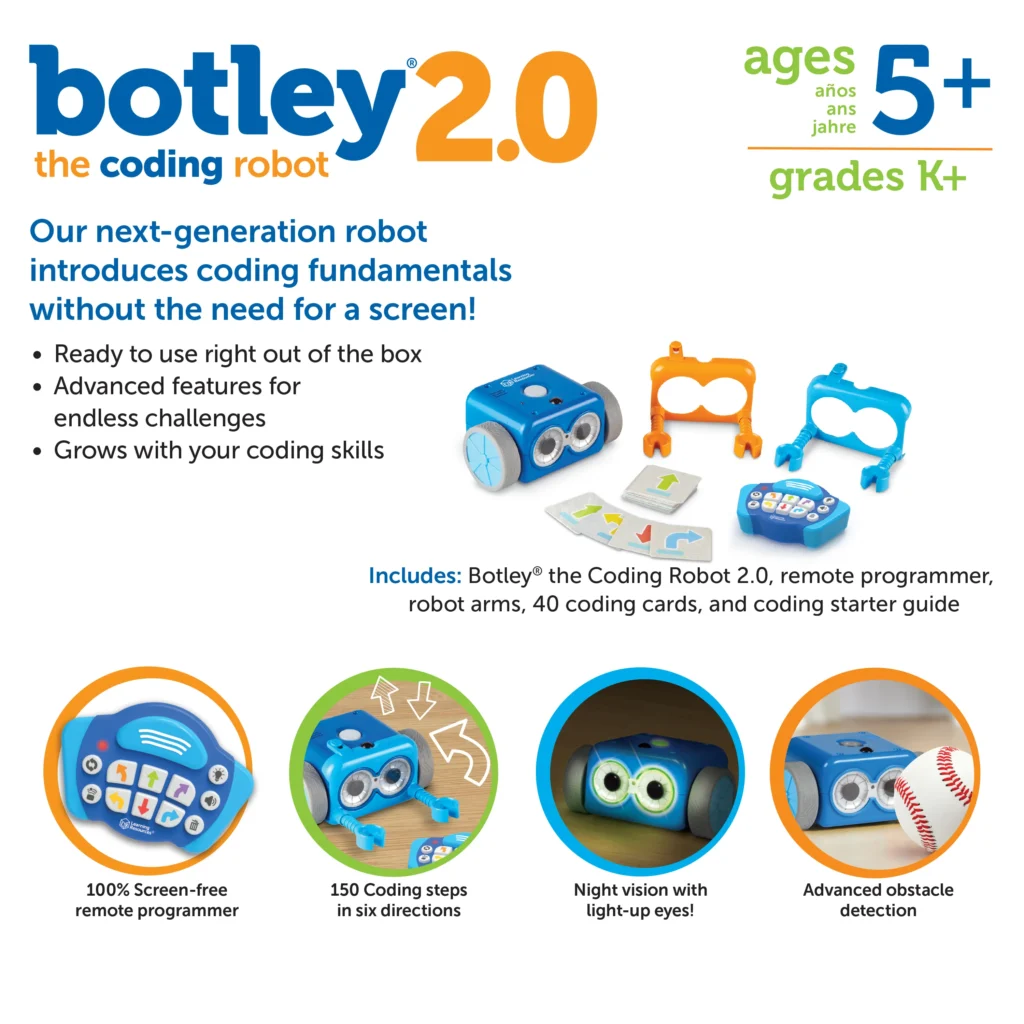
Where it shines / where it doesn’t: It’s playful, durable, and affordable for entry-level learning. Advanced logic is limited versus app-based kits, but for foundational skills and independent play, it’s a winner.
Wonder Workshop Dash (Best App-Guided Robot, Ages 6–11)
Apps, challenges, and growth path: Dash uses free apps like Blockly and Wonder so kids can program motion, lights, and sounds, respond to voice, and even tell stories.
There’s a clear path from drag-and-drop to JavaScript, plus loads of classroom-quality challenges that translate effortlessly to home.
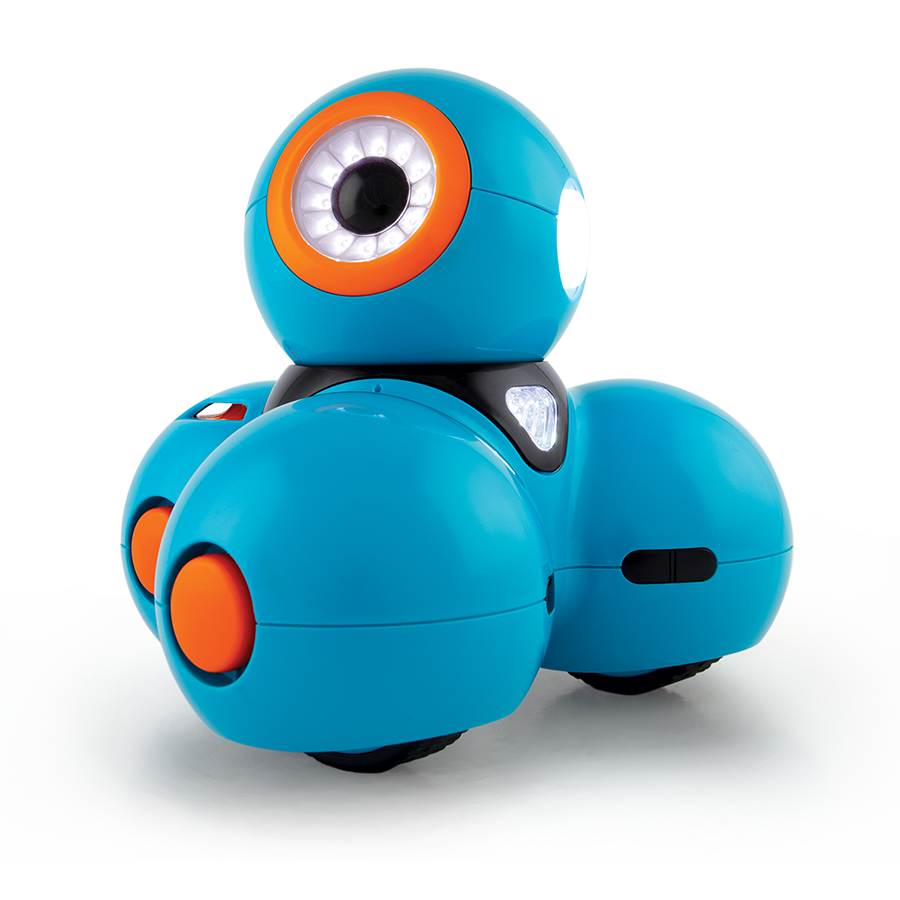
Classroom-quality at home: Dash is used in tens of thousands of schools worldwide, which means polished content, troubleshooting resources, and a big community. Parents benefit from the same curriculum strength at home.
micro:bit + ELECFREAKS Tinker Kit (Best Maker Bundle, Ages 8–12)
Sensors, circuits, and creativity: Pair a micro:bit with the ELECFREAKS Tinker Kit to unlock sensors, LEDs, buzzers, and motors. Kids prototype real circuits, bridging coding and electronics with step-by-step projects.
From blocks to typed code: Start in micro:bit’s block editor, then graduate to JavaScript or Python when ready. Makers will love that this kit grows with them and connects to broader “maker” ecosystems.
Makeblock mBot Neo / mBot2 (Best Step-Up Robot, Ages 8–12)
Scratch today, Python tomorrow: Makeblock’s mBot line is built for progression: block coding first, Python later.
The mBot2 (Neo) model adds improved sensors, stability, and classroom-ready durability, making it an excellent bridge from beginner to intermediate projects.
Expansion & accessories: Plenty of project ideas, optional add-ons, and robust community support. This is the kit you buy when your child is ready for deeper engineering and AI-flavored challenges.
LEGO Education SPIKE Essential (Best LEGO Coding for K–5)
Build-and-code with familiar bricks: SPIKE Essential blends LEGO builds with motors and sensors, making it perfect for younger builders in elementary grades.
It’s part of the LEGO Learning System, with classroom-ready units and activities that are also fantastic at home with parent guidance.
Real units and activities: Because it’s designed for K–5 classrooms, you’ll find standards-aligned lessons and projects that gently introduce STEAM concepts. If your child loves LEGO, this is a home-run entry point.
LEGO Education SPIKE Prime (Best Middle-School LEGO Robotics, Ages ~10+)
Why it’s the FLL pipeline: SPIKE Prime is widely used across grades 6–8 and ties directly into the FIRST® LEGO® League competition path. Expect more parts, more power, and more genuine engineering—still approachable but with serious depth.
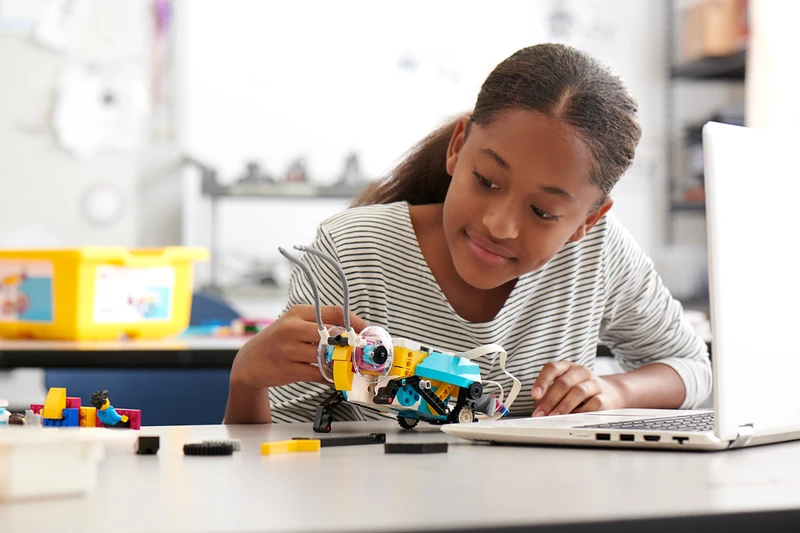
Scratch & Python support: Build with Technic elements, program with Scratch-based blocks, and step into Python when ready. For LEGO-loving tweens, Prime is the gold standard for building robust robots and applying real-world problem-solving.
Sphero RVR+ (Best Advanced, Expandable Robot, Ages 10–14+)
Open platform for serious tinkerers: RVR+ is a programmable robot car designed to be hacked, modded, and expanded. Use the Sphero Edu app for block coding and move up to Python and SDKs, while adding third-party hardware on top. It’s a sandbox for creativity.
Long-term learning path: With batteries, accessories, and class packs available, RVR+ is a platform kids won’t outgrow quickly. It’s ideal for older beginners who are ready to think like engineers.
Buying Guide: How to Choose the Right Kit
Match the kit to your child’s current skills
- Pre-readers (4–6): Start unplugged with Matatalab or Kids First to build sequencing and logic without screens.
- Early readers (6–9): Consider Dash or Botley 2.0—they add fun challenges while staying approachable.
- Curious makers (8–12): Go micro:bit + Tinker Kit or mBot Neo to mix coding with real electronics and sensors.
- Tweens (10–14+): SPIKE Prime or Sphero RVR+ introduce real engineering and Python.
Look for growth paths & community
A strong curriculum, active forums, and educator-tested lessons dramatically increase a kit’s lifespan. Dash and LEGO Education solutions are used globally in schools, so you’ll find endless projects and support.
Safety, device compatibility, and support
Confirm your phone/tablet works with the kit’s apps (where applicable) and check for warranty, tutorials, and replacement parts. LEGO and Sphero maintain dedicated resources; Makeblock and Wonder Workshop publish constant updates.
Frequently Asked Pitfalls (and Easy Fixes)
- Too hard, too soon: If your child stalls, step down to screen-free or simpler block coding. Quick wins restore motivation. Matatalab and Botley are perfect reset buttons.
- Not enough projects: Choose platforms with lesson libraries (LEGO, Wonder Workshop) so you always have the next challenge ready.
- One-and-done toys: Prioritize kits with expansions (mBot add-ons, LEGO hubs/sensors, RVR+ accessories). This protects your investment.
- No real-world connection: Maker kits like micro:bit + Tinker Kit let kids build alarms, games, and wearables—projects they can show off.
Final Verdict & Starter Combos for Different Ages
- Ages 4–7 (screen-free start):
Matatalab Coding Set → add Artist or Music add-ons later for creativity. If you want story missions, pair with Kids First Coding & Robotics. - Ages 6–10 (fun + structured):
Dash for polished, goal-based learning; add challenge cards and accessories for longer replay. For purely unplugged play, Botley 2.0 is a lower-cost companion. - Ages 8–12 (maker minds):
micro:bit + ELECFREAKS Tinker Kit to mix coding with circuits; step up to mBot Neo/mBot2 when ready for robotics and Python. - Ages 10–14+ (serious builders):
LEGO SPIKE Prime if your child loves LEGO and engineering challenges; choose Sphero RVR+ for an open, hackable platform that grows into high school projects.
Bottom line: choose the right starting point, then follow the growth path. The best kits in 2025 don’t just teach coding—they unlock creativity and confidence kids carry into every subject.
FAQs
Q1. What’s the best coding kit for a 5-year-old who can’t read yet?
Matatalab or Thames & Kosmos Kids First Coding & Robotics—both are screen-free and designed for pre-readers, using tangible pieces and stories to teach sequencing and logic.
Q2. My child is 8 and loves building things—robot or electronics kit?
Start with micro:bit + ELECFREAKS Tinker Kit to explore sensors and circuits. If they want a moving robot, step up to mBot Neo/mBot2 next.
Q3. We want something used in schools—what’s most “curriculum-ready”?
LEGO Education SPIKE (Essential/Prime) and Wonder Workshop Dash are widely used with extensive lessons and teacher guides.
Q4. Which kit lasts the longest as kids get more advanced?
Sphero RVR+ (add hardware, move to Python/SDK) or LEGO SPIKE Prime (Scratch to Python with robust engineering builds).
Q5. Is screen-free better than app-based?
Neither is “better”—they serve different stages. Go screen-free for ages 4–7 to build fundamentals; use app-based robots for ages 6+ when kids can handle more complex logic and feedback.