
AI for kids should begin with understanding, questioning and creating, not simply giving children access to the newest chatbot. This guide explains artificial intelligence in child-friendly language and gives parents and teachers an age-based path for exploring it safely.
AI for Kids: What Parents and Teachers Need to Know
Reviewed for families and educators. Product features and age requirements change, so always check a tool’s current terms, privacy settings and school policy before use.
What Is Artificial Intelligence?
Artificial intelligence, or AI, is technology that allows computers to learn, think and make decisions in ways that mimic human intelligence. Instead of following a fixed set of instructions, AI systems study patterns in data and improve their performance over time. From the voice assistants on your phone to the recommendation engine behind your favourite streaming service, AI is already woven into everyday life — and understanding it early gives children a powerful head start.
For kids, learning about AI is not just about technology. It is about developing critical thinking, creativity and problem-solving skills that will be essential in every career path of the future. Whether your child dreams of becoming a doctor, an artist, a game designer or an engineer, AI literacy will be as fundamental as reading and writing.
How Does AI Actually Work?
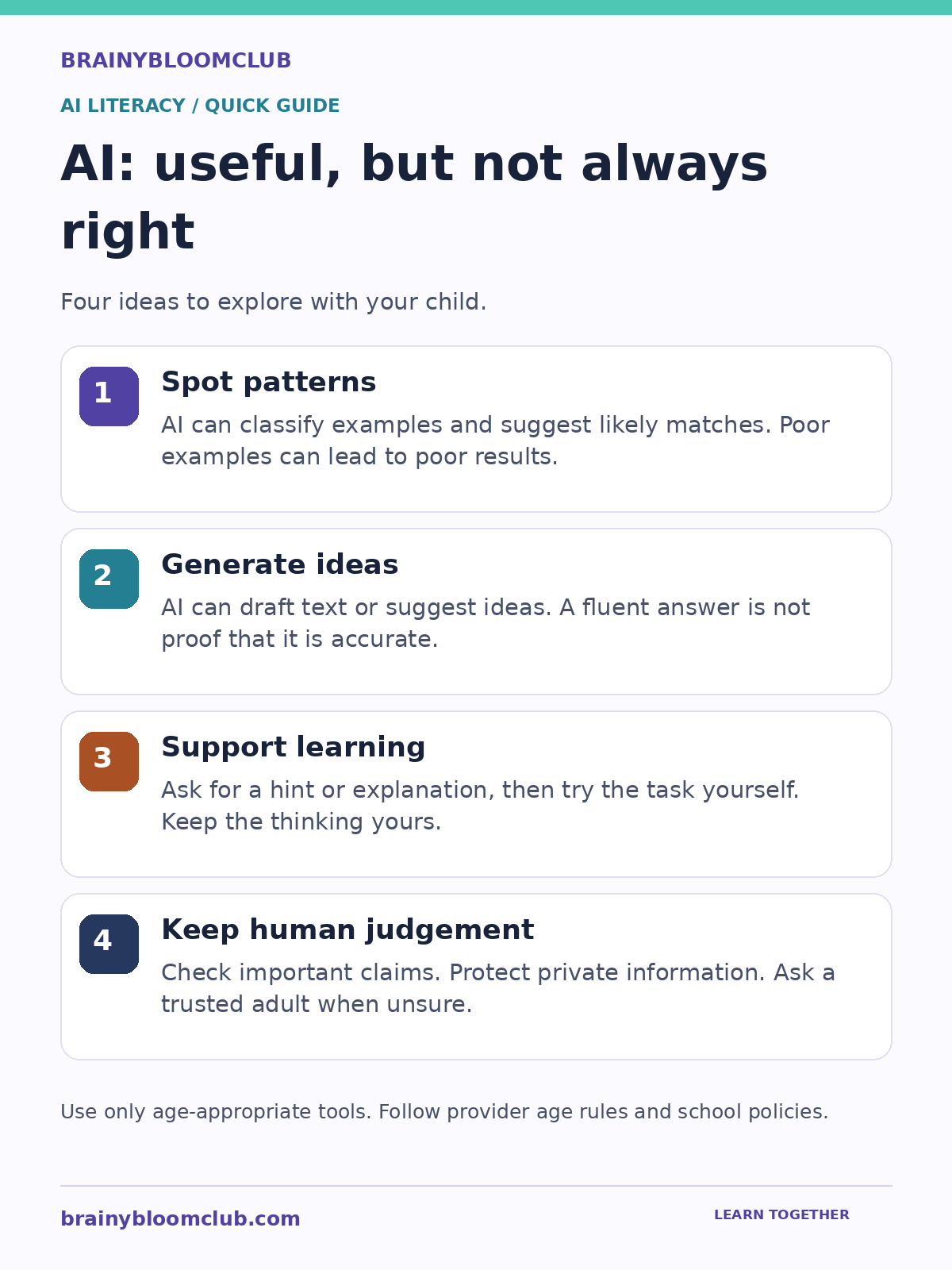
Graphic summary: AI can spot patterns and generate ideas, but its answers can be wrong. Use it to support practice, verify important claims and protect private information.
At its core, AI works by processing large amounts of data, finding patterns and using those patterns to make predictions or decisions. Think of it like teaching a child to recognise animals. You show them hundreds of pictures of cats and dogs. Over time, they learn to tell the difference — not because someone gave them a rulebook, but because their brain spotted the patterns. AI does something similar, but with mathematics and code instead of neurons.
Machine Learning
Machine learning is a branch of AI where computers learn from experience. Instead of being programmed with every possible answer, a machine learning model is trained on examples and gradually gets better at its task. Spam filters, music recommendations and photo recognition all rely on machine learning.
Neural Networks
Neural networks are inspired by the human brain. They consist of layers of connected nodes that process information step by step. Deep learning uses neural networks with many layers to tackle complex problems like language translation, medical diagnosis and self-driving cars.
Natural Language Processing
Natural language processing (NLP) is the branch of AI that helps computers understand, interpret and generate human language. Chatbots, voice assistants and AI writing tools all use NLP. When your child asks a smart speaker a question and gets a spoken answer, NLP is doing the heavy lifting behind the scenes.
Computer Vision
Computer vision enables machines to interpret images and video. It powers facial recognition, augmented reality filters, medical imaging and quality control in factories. Kids who have used apps that identify plants or animals from a photo have already experienced computer vision firsthand.
Why Should Kids Learn About AI?
AI is not a distant future concept. It is shaping the world children are growing up in right now. Here are the most important reasons to introduce AI early:
- Future-ready learning. AI is changing how people research, design and solve problems. Children need durable skills such as judgement, creativity and collaboration.
- Critical thinking. Understanding how AI makes decisions helps children question information, recognise bias and think analytically.
- Creativity. Generative AI tools let kids create art, music, stories and code — expanding what is possible for young creators.
- Digital citizenship. Children who understand AI are better equipped to navigate deepfakes, algorithmic recommendations and data privacy.
- Problem solving. AI projects teach kids to break big problems into smaller steps, test solutions and iterate — skills that transfer to every subject.
AI Concepts Every Child Should Know
You do not need a computer science degree to grasp the fundamentals. Here are the key AI concepts explained in plain language:
Algorithm
An algorithm is a step-by-step set of instructions for solving a problem. A recipe is an algorithm. A morning routine is an algorithm. In AI, algorithms are the mathematical recipes that process data and produce results.
Training Data
Training data is the information an AI model learns from. The quality and diversity of training data directly affects how well the AI performs. If you only train a model on pictures of golden retrievers, it will struggle to recognise a poodle.
Bias in AI
AI systems can inherit biases from their training data or from the people who build them. Teaching children about AI bias helps them become critical consumers of technology and future builders of fairer systems.
Prompt Engineering
Prompt engineering is the skill of writing clear, specific instructions for AI tools to get the best possible output. It is one of the most practical AI skills children can develop today, useful across writing, art, coding and research.
Generative AI
Generative AI creates new content — text, images, music, video or code — based on patterns it has learned. Tools like ChatGPT, DALL-E and Suno are examples. Children can use these tools creatively while learning the principles behind them.
Best AI Tools for Kids in 2026
These tools are safe, educational and designed with young learners in mind:
Google Teachable Machine
A free, browser-based tool that lets kids train their own machine learning models using images, sounds or poses. No coding required. Children can build a model that recognises hand gestures, facial expressions or objects in minutes.
Scratch + AI Extensions
MIT’s Scratch platform now supports AI extensions that let kids add image recognition, text classification and speech recognition to their projects. It is the perfect bridge between visual coding and AI concepts.
Machine Learning for Kids
Created by IBM engineer Dale Lane, this free platform guides children through building AI projects step by step. Kids train models, test them and use them in Scratch or Python projects.
ChatGPT with age-appropriate protections and adult guidance
ChatGPT provides a teen experience with additional safeguards and parental controls. Families should review the current parent resources, eligibility rules and privacy settings. Use it to ask questions, practise explanations and critique ideas, not as a substitute for learning or trusted human support.
Pictoblox
A Scratch-based coding platform with built-in AI and robotics capabilities. Kids can build face detection apps, voice-controlled robots and gesture-recognition games using drag-and-drop blocks.
Hands-On AI Projects for Kids
The best way to learn AI is by building. Here are project ideas organised by age group:
Ages 5 to 8: AI Without a Screen
- Sorting games. Give children a pile of objects and ask them to sort by colour, size or shape. Discuss how this is similar to how AI classifies data.
- 20 Questions with a twist. Play 20 Questions and explain that AI uses a similar process of elimination to make predictions.
- Draw a robot friend. Ask children to design a robot that solves a real problem. Discuss what data the robot would need and what decisions it would make.
Ages 9 to 12: First AI Projects
- Teachable Machine image classifier. Train a model to recognise different types of fruit, pets or hand signals.
- Scratch chatbot. Build a simple chatbot in Scratch that responds to user input with pre-programmed answers, then upgrade it with AI text classification.
- AI art generator. Use age-appropriate generative AI tools to create original artwork, then discuss how the AI learned to create images.
Ages 13 and Up: Intermediate AI
- Python sentiment analyser. Write a Python script that analyses the mood of movie reviews or social media posts.
- Custom AI assistant. Use an API to build a personal study assistant that answers questions about a specific subject.
- AI ethics debate. Research a real-world AI ethics case (facial recognition in schools, AI-generated homework, deepfakes) and present arguments for and against.
AI Safety and Ethics for Young Learners
Teaching AI without discussing safety and ethics is incomplete. Children need to understand:
- AI can be wrong. AI models hallucinate — they generate confident-sounding answers that are factually incorrect. Children must learn to verify AI outputs.
- Privacy matters. AI tools collect data. Children should never share personal information, photos or location data with AI platforms without parental guidance.
- Bias is real. AI systems can reflect and amplify societal biases. Discussing this openly helps children become responsible future builders.
- AI is a tool, not a replacement. AI should enhance learning, not replace thinking. Children should use AI to explore, create and iterate — not to avoid doing the work.
AI Career Paths for the Next Generation
Children who build AI literacy today will have access to some of the most exciting and impactful careers of the future:
- AI Engineer. Designs, builds and deploys AI systems for companies and organisations.
- Machine Learning Researcher. Pushes the boundaries of what AI can do through academic and industrial research.
- Prompt Engineer. Crafts effective prompts for generative AI systems — one of the fastest-growing new roles.
- AI Ethics Officer. Ensures AI systems are fair, transparent and aligned with human values.
- Robotics Engineer. Combines AI with physical hardware to build robots for healthcare, manufacturing, exploration and more.
- Data Scientist. Analyses complex datasets to uncover insights and build predictive models.
- AI Product Manager. Guides the development of AI-powered products from concept to launch.
- Computer Vision Specialist. Builds systems that interpret visual information for medical imaging, autonomous vehicles and security.
How Parents Can Support AI Learning at Home
You do not need to be a tech expert to help your child explore AI. Here is a practical roadmap:
- Start conversations. Ask your child what they think AI is. Discuss AI they already use — voice assistants, recommendation algorithms, autocorrect.
- Explore together. Try tools like Google Teachable Machine or Machine Learning for Kids as a family activity.
- Set boundaries. Establish clear rules for AI tool usage, especially around data sharing and screen time.
- Encourage questions. When your child uses an AI tool, ask: How do you think it knew that? Could it be wrong? What data did it need?
- Connect AI to interests. If your child loves art, explore AI art generators. If they love sports, look at how AI is used in performance analysis. AI touches every field.
- Build a portfolio. Encourage your child to save their AI projects. A portfolio of AI experiments is increasingly impressive for school applications and future opportunities.
Frequently Asked Questions
What age should kids start learning about AI?
Children as young as five can begin exploring AI concepts through unplugged activities and simple sorting games. Screen-based AI tools like Teachable Machine are suitable from around age eight. Python-based AI projects work well from age twelve onward.
Is AI safe for children?
AI tools designed for education are generally safe when used with parental guidance. The key risks involve data privacy, exposure to inaccurate information and over-reliance on AI for schoolwork. Setting clear boundaries and maintaining open conversations about AI limitations keeps children safe.
Do kids need to know coding to learn AI?
No. Many AI learning platforms use visual, drag-and-drop interfaces that require no coding experience. However, children who learn Python alongside AI concepts will unlock more advanced projects and deeper understanding.
What is the best programming language for AI?
Python is the most widely used language in AI and machine learning. It has a gentle learning curve, massive community support and powerful AI libraries. For younger children, Scratch with AI extensions is an excellent starting point.
Will AI replace human jobs?
AI will transform jobs rather than simply eliminate them. Routine tasks will be automated, but new roles will emerge that require human creativity, empathy, judgement and collaboration with AI systems. Children who understand AI will be best positioned to thrive in this evolving landscape.
Start Your Child’s AI Journey Today
Artificial intelligence is not just for engineers and scientists. It is a foundational skill for every child growing up in the 2020s and beyond. The best time to start is now — and you do not need expensive courses or equipment. A curious mind, a browser and a willingness to experiment are all it takes.
Explore more on BrainyBloomClub: browse our Artificial Intelligence hub for the latest AI news, tools, projects and career guides — all designed for kids, parents and educators.
Sources and Further Reading
BrainyBloomClub reviews child-facing technology guidance against current provider information and established child-safety resources. Last reviewed: August 2026.
Next step: Explore the Artificial Intelligence hub, Digital Safety hub or STEM Projects hub for related age-guided resources.