Home Blog Page 4

5 Fun AI Projects Kids Can Build This Weekend

These AI projects for kids turn artificial intelligence from an abstract idea into something children can test. Each activity is designed for a weekend session, with an adult nearby to help with accounts, cameras, privacy settings and troubleshooting. The goal is not a perfect result. It is learning why models succeed, fail and sometimes behave unfairly.

AI Projects for Kids: What You Need Before Starting

You do not need weeks of study to build something with AI. These five projects can each be completed in a single afternoon, require no prior coding experience and use free, browser-based tools. They are perfect for kids aged eight and up who want to see what artificial intelligence can really do — by building it themselves.

Project 1: Train an Image Classifier with Teachable Machine

Time: 30 to 60 minutes
Tool: Google Teachable Machine (free, browser-based)
Ages: 8 and up

Train your own AI to recognise different objects using your webcam. You will create categories (like “thumbs up” vs “thumbs down” vs “peace sign”), show the AI examples of each and watch it learn to tell them apart in real time.

How to Build It

  1. Go to teachablemachine.withgoogle.com and select “Image Project.”
  2. Create two or three classes (categories). Name them — for example, “Cat” and “Dog” if you have pets, or “Happy Face” and “Sad Face.”
  3. Use your webcam to capture 30 to 50 sample images for each class. Move around, change angles and vary the background.
  4. Click “Train Model” and wait about 30 seconds.
  5. Test it live — hold up different objects or make different expressions and watch the AI classify them in real time.

What You Will Learn

This project teaches how AI learns from training data. Try giving one class only five images and another fifty — you will see how data quantity affects accuracy. Try training it in perfect lighting, then testing in dim light — you will discover how real-world conditions challenge AI. These are the exact problems professional AI engineers solve every day.

Project 2: Build a Rock-Paper-Scissors AI

Time: 45 to 90 minutes
Tool: Google Teachable Machine + Scratch
Ages: 9 and up

Combine Teachable Machine with Scratch to build a game where the AI recognises your hand gestures and plays rock-paper-scissors against you.

How to Build It

  1. Train a Teachable Machine model with three classes: Rock (fist), Paper (open hand) and Scissors (two fingers).
  2. Export the model and note the shareable link.
  3. Open Scratch and use the Teachable Machine extension (available in some Scratch forks like ML Scratch) to connect your model.
  4. Program the game logic: when the AI detects your gesture, the computer randomly picks its own move and determines the winner.
  5. Add scoring, sound effects and animations to make it a polished game.

What You Will Learn

This project connects AI perception (recognising gestures) with game logic (determining a winner). It shows how AI can be integrated into interactive applications — the same principle behind facial recognition, gesture controls and augmented reality.

Project 3: Create an AI Sound Detector

Time: 30 to 45 minutes
Tool: Google Teachable Machine (Audio Project)
Ages: 8 and up

Train an AI to recognise different sounds — clapping, snapping, whistling, your voice saying specific words or even musical instruments.

How to Build It

  1. Open Teachable Machine and select “Audio Project.”
  2. Create classes for different sounds: “Clap,” “Snap,” “Whistle” and “Background Noise.”
  3. Record 20 to 30 short audio samples for each class.
  4. Train the model and test it by making different sounds into your microphone.
  5. Challenge: Can the AI tell the difference between two family members saying the same word?

What You Will Learn

This project demonstrates how voice assistants like Siri and Alexa work. They use similar audio classification to detect wake words, understand speech and distinguish between speakers. You will also learn why background noise makes AI less accurate — a real engineering challenge.

Project 4: Write a Story with AI, Then Make It Better

Time: 45 to 60 minutes
Tool: ChatGPT or any AI writing assistant (with parental supervision for under 13s)
Ages: 10 and up

Use AI to generate a short story, then critically edit and improve it yourself. This project teaches both how generative AI works and why human creativity still matters.

How to Build It

  1. Give the AI a creative prompt: “Write a 300-word adventure story about a robot who discovers a hidden underwater city.”
  2. Read the story carefully. Mark what works and what does not.
  3. Rewrite the story yourself, keeping the parts you like and improving the rest. Add better descriptions, stronger characters and a more surprising ending.
  4. Compare the two versions side by side. Which is better? Why?
  5. Bonus: Ask the AI to rewrite its own story in a different style (funny, scary, poetic) and compare all three versions.

What You Will Learn

AI generates text by predicting likely word sequences — which produces competent but often generic writing. Human writers add originality, emotion and surprise that AI struggles to replicate. This project shows children that AI is a starting point, not a finished product.

Project 5: Build a Bias Detective Experiment

Time: 30 to 45 minutes
Tool: Google Teachable Machine
Ages: 9 and up

Deliberately train a biased AI model, then investigate how and why it fails. This is one of the most important lessons in AI — understanding bias.

How to Build It

  1. Create an image classifier with two classes: “Fruit” and “Not Fruit.”
  2. For the “Fruit” class, only use images of red apples — nothing else.
  3. Train the model and test it with a red apple. It should work perfectly.
  4. Now test with a banana, a green apple, an orange or a bunch of grapes. Does the AI recognise them as fruit?
  5. Discuss: Why did the AI fail? What would you need to change in the training data to fix it?

What You Will Learn

AI systems are only as good as their training data. If the data is narrow, biased or unrepresentative, the AI will make narrow, biased decisions. This is exactly how bias enters real-world AI systems — from hiring algorithms that discriminate to medical AI that performs worse on certain populations. Understanding this makes children more critical and responsible AI users.

What to Do Next

Once you have completed these five projects, you have a solid foundation in how AI perceives images and sounds, generates text and can be biased by its training data. From here, you can explore more advanced AI projects with Python, dive into machine learning with Scratch AI extensions or start building AI-powered apps.

Find more project ideas on our Artificial Intelligence hub and explore the complete AI guide for kids.

Sources and Further Reading

BrainyBloomClub reviews child-facing technology guidance against current provider information and established child-safety resources. Last reviewed: August 2026.

Next step: Explore the Artificial Intelligence hub, Digital Safety hub or STEM Projects hub for related age-guided resources.


How ChatGPT Works: A Simple Guide for Kids

How does ChatGPT work for kids? The simplest answer is that it repeatedly predicts which words are likely to come next, using patterns learned during training. That can produce useful explanations and creative ideas, but it can also produce convincing mistakes. This guide separates the impressive experience from what the system is actually doing.

How Does ChatGPT Work for Kids?

ChatGPT is one of the most talked-about technologies in the world — but how does it actually work? If you have ever wondered how an AI chatbot can write essays, answer questions, create stories and even help with coding, this guide explains it all in simple language that kids, parents and educators can understand.

What Is ChatGPT?

ChatGPT is an AI chatbot made by a company called OpenAI. You type a question or instruction, and it generates a response that sounds like it was written by a human. It can explain science concepts, help with homework, write poems, debug code, translate languages and have conversations on almost any topic.

But ChatGPT is not thinking the way you or I think. It does not understand the world. It is doing something much more specific — and understanding what that is helps you use it smarter and spot when it goes wrong.

How ChatGPT Learns: Training on Text

ChatGPT learned by reading enormous amounts of text from the internet — books, articles, websites, forums and more. During training, the AI was shown billions of sentences and learned patterns in language: which words tend to follow other words, how sentences are structured and how ideas connect.

Think of it like this: if you read thousands of recipe books, you would start to notice patterns. Cake recipes usually mention flour, sugar and eggs. Instructions usually start with a verb. Desserts come after main courses. You would not understand cooking — but you could predict what a recipe should say next. That is essentially what ChatGPT does with language.

The Next-Word Prediction Machine

At its core, ChatGPT is a next-word prediction machine. When you type a question, the AI looks at your words and predicts the most likely next word in the response. Then it predicts the word after that, and the word after that, one at a time, until the response is complete.

For example, if the AI sees “The capital of France is…” it predicts “Paris” because that pattern appeared millions of times in its training data. The responses sound intelligent because the patterns in human language are incredibly rich and structured — and the AI has learned billions of them.

What Is a Large Language Model?

ChatGPT is built on something called a large language model (LLM). “Large” refers to the enormous amount of data it was trained on and the billions of mathematical parameters it uses to make predictions. “Language model” means it models how language works — the statistical relationships between words, phrases and ideas.

Other large language models include Google’s Gemini, Anthropic’s Claude and Meta’s Llama. They all work on similar principles but are trained on different data and designed with different goals.

Why ChatGPT Gets Things Wrong

Because ChatGPT predicts likely words rather than looking up verified facts, it sometimes generates information that sounds confident but is completely wrong. This is called hallucination. The AI might invent a fake book title, cite a research paper that does not exist or confidently state an incorrect date.

This is the most important thing to understand about ChatGPT: it sounds sure even when it is wrong. Always verify important information from AI with a trusted source — a teacher, a textbook or a reliable website.

What ChatGPT Can and Cannot Do

ChatGPT Can:

  • Explain concepts in simple language
  • Help brainstorm ideas for projects and essays
  • Write and debug code
  • Translate text between languages
  • Summarise long articles or documents
  • Generate creative writing, poems and stories
  • Answer questions about a wide range of topics

ChatGPT Cannot:

  • Guarantee accuracy — it can and does make mistakes
  • Access the internet in real time (unless using specific plugins)
  • Understand context the way humans do
  • Have feelings, opinions or consciousness
  • Replace original thinking and learning

How Kids Can Use ChatGPT Responsibly

  1. Use it as a study buddy, not an answer machine. Ask ChatGPT to explain a concept, then try to restate it in your own words.
  2. Always fact-check. If ChatGPT tells you something important, verify it with a teacher or trusted source.
  3. Never share personal information. Do not tell ChatGPT your full name, address, school name or any private details.
  4. Be transparent. If you use ChatGPT for schoolwork, tell your teacher how you used it. Honesty builds trust.
  5. Learn from the process. The value is in understanding, not in copying an AI’s output.

Try It Yourself: Fun ChatGPT Experiments

  • Ask ChatGPT to explain a difficult topic “like I’m 8 years old” and see how it simplifies the language.
  • Give it a wrong fact and see if it corrects you or agrees — this shows how hallucination works.
  • Ask it to write a story, then rewrite the story better yourself. Compare the two versions.
  • Use it to brainstorm project ideas, then pick your favourite and build it without AI help.

Frequently Asked Questions

Is ChatGPT free?

ChatGPT has a free tier that provides access to the basic model. The paid version (ChatGPT Plus) offers faster responses and access to more advanced models.

Is ChatGPT safe for kids?

No general-purpose AI tool is risk-free. Families should use current age-appropriate protections, review privacy settings, follow school rules and teach children not to share sensitive information. A chatbot should never replace a trusted adult or professional support.

Can ChatGPT do my homework for me?

It can generate answers, but submitting AI-generated work as your own is dishonest and means you miss the learning. Use ChatGPT to understand concepts and check your thinking — then do the work yourself.

Explore more AI guides on our Artificial Intelligence hub and learn about the best AI tools for students.

Sources and Further Reading

BrainyBloomClub reviews child-facing technology guidance against current provider information and established child-safety resources. Last reviewed: August 2026.

Next step: Explore the Artificial Intelligence hub, Digital Safety hub or STEM Projects hub for related age-guided resources.
How to Talk to Kids About AI: A Parent’s Guide

0

Knowing how to talk to kids about AI matters more than knowing every technical term. Children need calm, honest conversations about what AI can do, where it fails and when to ask an adult for help. Use the age-based explanations and prompts below to start a conversation that grows with your child.

How to Talk to Kids About AI by Age

Your child is already using AI — whether they know it or not. From YouTube recommendations to voice assistants to AI-generated content in their social feeds, artificial intelligence is woven into their daily life. This guide helps you start meaningful conversations about AI that build understanding without creating fear.

Why Parents Need to Talk About AI Now

AI is no longer science fiction. Children are interacting with AI tools in school, at home and through entertainment. Without guidance, they may develop misconceptions — believing AI is magical, infallible or dangerous. The goal is to help them become informed, thoughtful users of AI technology.

Age-Appropriate AI Conversations

Ages 4 to 7: “Smart Helpers”

At this age, focus on the idea that some machines can learn from examples — just like children do. Point out everyday AI: “Alexa can understand your voice because people taught it lots of words.” Keep it concrete and relatable. Avoid technical jargon.

Ages 8 to 11: “Pattern Finders”

Children at this age can understand that AI works by finding patterns in data. Show them examples: how Netflix suggests shows based on what they have watched, how spam filters learn which emails are junk. Introduce the idea that AI can make mistakes because it only knows what it has been trained on.

Ages 12 and Up: “Powerful but Limited”

Teenagers can engage with deeper concepts: bias in AI training data, privacy implications, deepfakes and misinformation, the difference between narrow AI and general intelligence. Encourage critical thinking: “Just because an AI said it does not mean it is true.”

5 Questions Kids Ask About AI

  1. “Is AI alive?” — No. AI is software running on computers. It does not have feelings, consciousness or desires. It processes information and produces outputs based on its training.
  2. “Will robots take over?” — Current AI is very narrow — it can do specific tasks well but cannot think, plan or want things the way humans do. The robots-taking-over scenario is science fiction, not reality.
  3. “Can AI do my homework?” — AI tools can help with research and learning, but submitting AI-generated work as your own is dishonest. Using AI to understand a concept is learning. Using AI to avoid learning is cheating.
  4. “Does AI spy on me?” — AI systems do collect data to work properly. This is why privacy settings matter. Teach children what data they share and how to control it.
  5. “Will AI take my future job?” — AI will change many jobs but also create new ones. The best preparation is learning to work alongside AI, think critically and solve problems creatively — skills that are hard to automate.

Building AI Literacy at Home

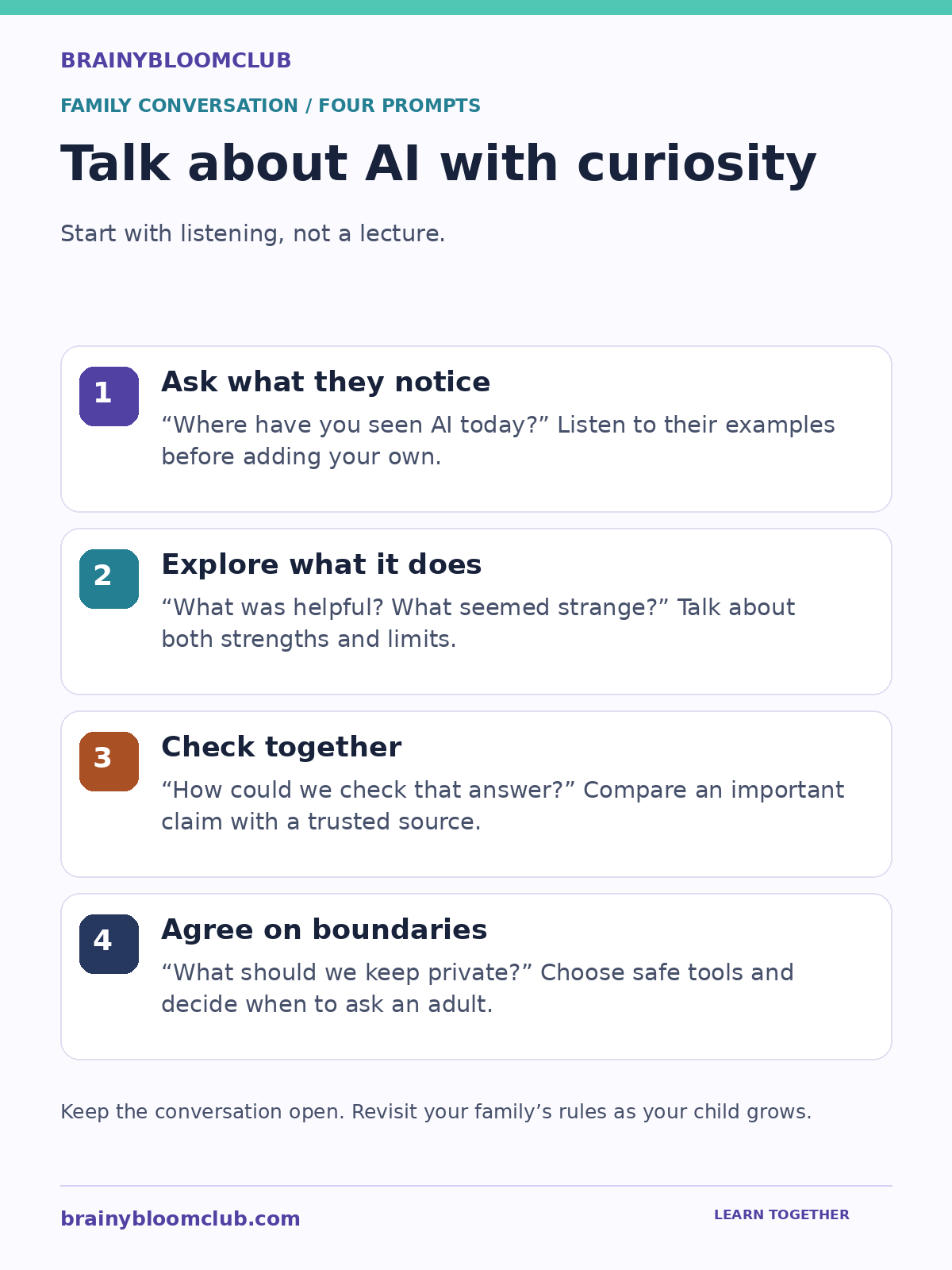
Four prompts for discussing AI: ask what children notice, explore its strengths and limits, check answers together, and agree on privacy boundaries.
Parent-child AI conversation guide. Original BrainyBloomClub graphic. Select the image to view full size.

Graphic summary: Ask where your child notices AI, discuss what seems helpful or strange, check important answers together and agree on what to keep private.

  • Experiment together. Try AI tools as a family — image generators, chatbots, music creators. Discuss what the AI does well and where it fails.
  • Play “spot the AI.” Challenge children to identify AI in their daily life: autocorrect, face filters, game opponents, personalised ads.
  • Discuss AI in the news. When AI stories appear in the media, talk about them. Separate hype from reality together.
  • Encourage creation over consumption. Instead of just using AI, encourage children to learn how it works — through coding, robotics or AI experiment platforms designed for kids.

Frequently Asked Questions

Should I let my child use ChatGPT?

Most AI chatbots have age restrictions (typically 13+). For younger children, supervised use can be educational. For teenagers, focus on teaching them to verify AI outputs, understand limitations and use it as a tool rather than an authority.

How do I keep up when AI changes so fast?

You do not need to be an expert. Focus on principles that stay constant: critical thinking, privacy awareness, ethical use. The specific tools will change, but the ability to evaluate them thoughtfully will always matter.

Explore more parenting resources on our Parents hub and learn about AI basics on our AI hub.

Sources and Further Reading

BrainyBloomClub reviews child-facing technology guidance against current provider information and established child-safety resources. Last reviewed: August 2026.

Next step: Explore the Artificial Intelligence hub, Digital Safety hub or STEM Projects hub for related age-guided resources.

Raising an AI-Ready Child: Essential Parent Guide

0

Raising an AI-ready child is not about teaching every new tool. It means developing curiosity, critical thinking, privacy awareness and the confidence to create original work. This parent roadmap shows which habits matter at each age and how to build them without technology taking over the learning process.

How to Raise an AI-Ready Child

What Does AI-Ready Mean for Children?

An AI-ready child is not a miniature data scientist or a prodigy who builds neural networks before breakfast. An AI-ready child is one who understands what artificial intelligence is, how it works at a basic level, where it shows up in daily life, what it can and cannot do, and how to use it responsibly. Just as previous generations needed to become computer literate, this generation needs to become AI literate — and parents are the most important teachers.

Raising an AI-ready child does not require a technical background. It requires curiosity, intentional conversations and a willingness to explore new tools together. This guide gives parents a practical, step-by-step framework for building AI literacy at every age.

Why AI Literacy Matters Now

AI is not coming — it is already here. Your child interacts with AI every day, often without realising it:

  • YouTube and TikTok recommendations are driven by AI algorithms that learn what each viewer likes.
  • Voice assistants like Siri, Alexa and Google Assistant use natural language processing to understand and respond to speech.
  • Autocorrect and predictive text on phones use machine learning to anticipate words.
  • Face filters on Snapchat and Instagram use computer vision to detect and modify facial features in real time.
  • Search engines use AI to understand the intent behind queries and rank results.
  • Gaming — many video game characters use AI to adapt their behaviour based on how the player plays.

Children who understand these systems are empowered users. Those who do not are passive consumers shaped by algorithms they cannot see or question.

The 5 Pillars of AI Literacy for Children

1. Understanding: What AI Is and How It Works

Children should understand that AI is technology that learns from data and makes predictions or decisions based on patterns. They do not need to understand the mathematics — they need to grasp the concept. Analogies work well: AI learns like a child learns to recognise dogs, by seeing many examples and spotting patterns.

2. Recognition: Spotting AI in Daily Life

Once children understand the concept, they can start identifying AI around them. Turn it into a game: “Is that AI?” When the streaming service suggests a show, when the phone autocompletes a sentence, when a chatbot answers a question — that is AI at work. Recognition builds awareness and critical thinking.

3. Critical Thinking: Questioning AI Outputs

AI can be wrong. It hallucinates facts, reflects biases from its training data and sometimes produces harmful outputs. Children need to learn to ask: Is this accurate? Who trained this AI? What data did it learn from? Could it be biased? These questions build a healthy scepticism that protects children online and develops analytical skills for every subject.

4. Ethics: Understanding Fairness, Privacy and Responsibility

AI raises important ethical questions that children can engage with at every age. Should facial recognition be used in schools? Is it fair if an AI system rejects someone’s loan application based on their postcode? Who is responsible when a self-driving car makes a mistake? These discussions develop moral reasoning alongside technical understanding.

5. Creation: Building with AI Tools

The highest level of AI literacy is creating with AI — training models, building AI-powered projects and using generative AI tools as creative instruments. Children who move from consumers to creators develop confidence, agency and skills that will be directly valuable in future education and careers.

AI Parenting by Age Group

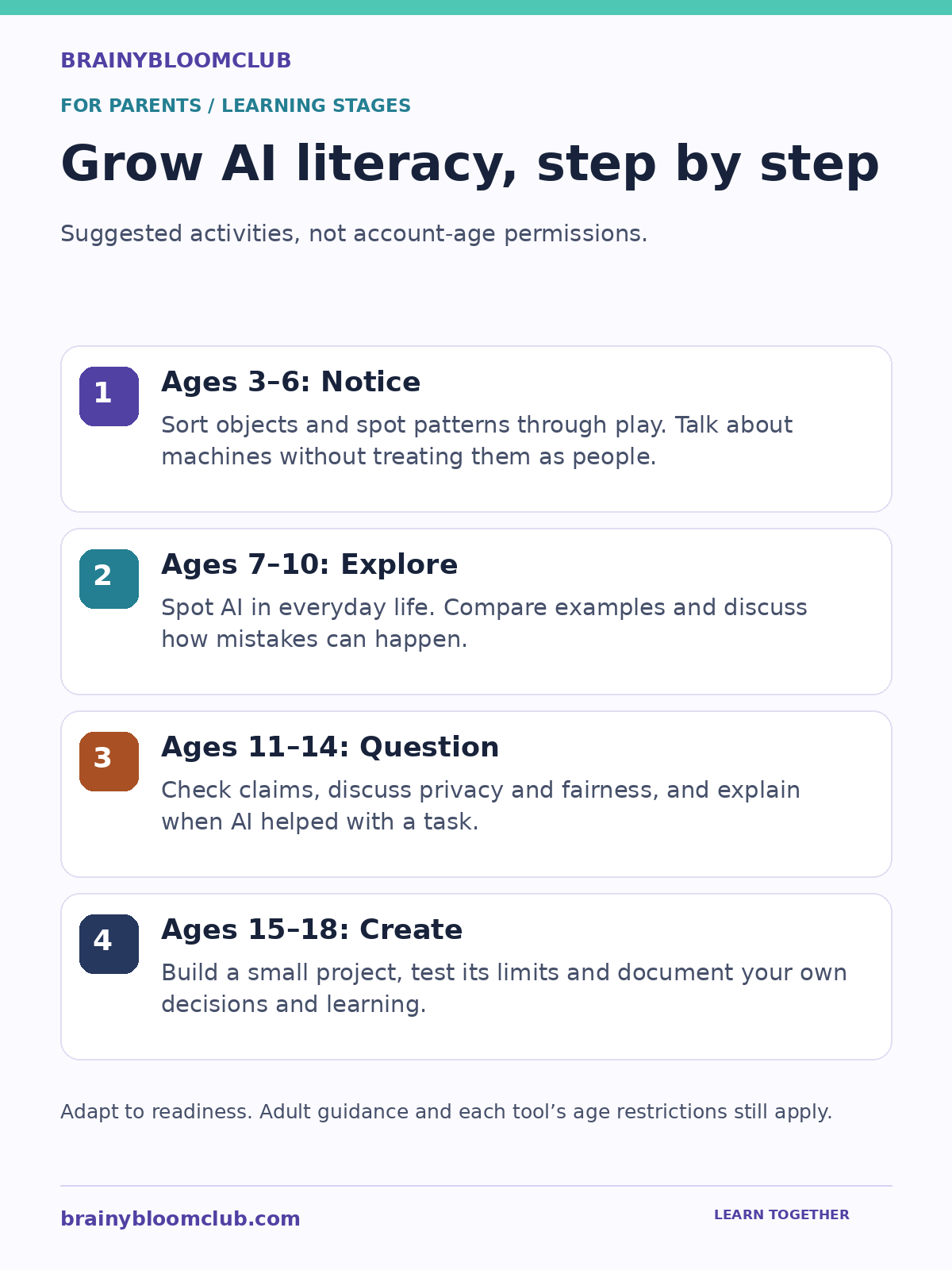
AI learning stages: notice at ages 3–6, explore at 7–10, question at 11–14, and create at 15–18.
AI-ready child learning roadmap. Original BrainyBloomClub graphic. Select the image to view full size.

Graphic summary: Start with sorting and pattern play, then explore everyday AI, question accuracy and fairness, and build projects. These are suggested learning stages, not account-age permissions; follow each tool’s rules.

Ages 3 to 6: Build the Foundation

  • Play sorting and pattern games — these mirror how AI classifies data.
  • Talk about how smart speakers understand speech: “It listens for patterns in your words.”
  • Use age-appropriate language: “The computer is really good at spotting patterns, just like you are good at sorting shapes.”
  • Avoid anthropomorphising AI. Say “The computer figured out the pattern” not “Alexa knows the answer.”

Ages 7 to 10: Explore and Question

  • Introduce Google Teachable Machine — let your child train an image classifier and discuss what happens when the training data is limited or biased.
  • Play “Is That AI?” regularly. Identify AI in apps, games, search engines and recommendations.
  • Discuss recommendations: “Why do you think YouTube suggested that video? What does the algorithm know about you?”
  • Explore Scratch AI extensions or Pictoblox for hands-on AI projects.
  • Set rules for voice assistant use and discuss data privacy in simple terms.

Ages 11 to 14: Deepen Understanding

  • Introduce ChatGPT or similar tools with clear guidelines. Discuss hallucination, bias and the difference between AI output and verified facts.
  • Explore AI ethics cases together: deepfakes, algorithmic bias in hiring, AI-generated art and copyright.
  • Encourage Python-based AI projects: sentiment analysis, image classification, chatbot building.
  • Discuss AI in school: when is it appropriate to use AI for homework? What counts as plagiarism?
  • Review privacy settings on all AI-enabled apps and services.

Ages 15 to 18: Prepare for the Future

  • Support deeper specialisation: AI/ML courses, advanced Python projects, competition participation.
  • Discuss AI’s impact on their future career interests — every field is being transformed.
  • Encourage portfolio building: AI projects, research papers, blog posts, open-source contributions.
  • Explore university courses and careers that combine AI with their interests (AI + medicine, AI + art, AI + law).
  • Have ongoing conversations about responsible AI use, data privacy and digital citizenship.

Setting Healthy AI Boundaries at Home

AI tools are powerful, and like any powerful tool, they need boundaries. Here is a framework for parents:

  1. Establish a family AI policy. Decide which AI tools are approved, how they can be used and what information can be shared. Write it down and revisit it regularly.
  2. Use AI together first. Before letting children use AI tools independently, explore them together. Model critical thinking: “Let’s check if this answer is actually correct.”
  3. Set time limits. AI tools can be absorbing. Include them in your family’s overall screen time guidelines.
  4. Require disclosure. If your child uses AI for schoolwork, require them to note which tool they used and how. This builds honesty and self-awareness.
  5. Review outputs together. Periodically sit with your child while they use AI tools. Discuss what the AI got right, what it got wrong and why.
  6. Protect personal data. Teach children never to share full names, addresses, school names, photos or other personal information with AI tools.

Common Mistakes Parents Make

  • Banning AI entirely. Prohibition does not work — children will encounter AI at school, at friends’ houses and on their phones. Education and guidance are more effective than blanket bans.
  • Assuming AI is always accurate. Some parents treat AI outputs as authoritative. Model healthy scepticism — always verify important information from AI tools.
  • Ignoring AI because it feels too technical. You do not need to understand how neural networks work to have meaningful conversations about AI with your child. Start with what AI does, not how it does it.
  • Using AI as a digital babysitter. AI chatbots are not supervised environments. Children under thirteen should not use general-purpose AI tools without parental awareness and guidelines.
  • Waiting too long. AI literacy starts with conversations, not computers. Even preschoolers can begin understanding patterns, sorting and simple decision-making — the building blocks of AI thinking.

Recommended AI Tools for Families

  • Google Teachable Machine — train AI models with images, sounds or poses. Free, browser-based, no account required.
  • Machine Learning for Kids — guided AI projects for Scratch and Python. Free.
  • Pictoblox — Scratch-based coding with AI features. Free version available.
  • ChatGPT — versatile AI assistant for research, brainstorming and coding help. Free tier available. Ages 13+ with guidance.
  • NotebookLM — AI research assistant grounded in user-uploaded documents. Free. Ages 12+.
  • Perplexity AI — research engine with cited sources. Free tier available. Ages 12+.

Frequently Asked Questions

At what age should I introduce AI to my child?

Conversations about patterns, sorting and how smart devices work can start as early as age three or four. Hands-on AI tools like Teachable Machine are appropriate from age eight. General-purpose AI tools like ChatGPT should be introduced around age thirteen with clear guidelines and parental involvement.

Do I need to understand AI myself to teach my child?

No. The most important things you can do are ask questions, explore tools together and model critical thinking. You do not need to explain backpropagation — you need to ask “How do you think the AI knew that?” and “Could it be wrong?”

Is AI dangerous for children?

AI tools designed for education are generally safe. The risks come from unsupervised use of general-purpose AI, sharing personal data with AI platforms and treating AI outputs as infallible truth. Parental guidance, clear boundaries and ongoing conversations mitigate these risks effectively.

Should I let my child use ChatGPT for homework?

Using ChatGPT to understand concepts, brainstorm ideas, check reasoning and explore topics is valuable learning. Submitting AI-generated text as original work is dishonest. Teach the distinction, require disclosure and follow your school’s AI policy.

How do I keep up with AI developments?

Follow trusted sources that explain AI in accessible language. BrainyBloomClub covers AI developments through the lens of children’s education. Subscribe to our newsletter, follow our AI hub and explore new tools together as a family.

Start the Conversation Today

Raising an AI-ready child is not about predicting the future or mastering complex technology. It is about building the habits of curiosity, critical thinking and responsible use that will serve your child in any future they choose. The best time to start is now — and the best way to start is together.

Explore more on BrainyBloomClub: browse our Parents hub and Artificial Intelligence hub for parenting guides, AI tools, project ideas and expert advice — all designed for families navigating the AI age.

Sources and Further Reading

BrainyBloomClub reviews child-facing technology guidance against current provider information and established child-safety resources. Last reviewed: August 2026.

Next step: Explore the Artificial Intelligence hub, Digital Safety hub or STEM Projects hub for related age-guided resources.
AI for Kids: The Ultimate Guide to Artificial Intelligence in 2026

AI for kids should begin with understanding, questioning and creating, not simply giving children access to the newest chatbot. This guide explains artificial intelligence in child-friendly language and gives parents and teachers an age-based path for exploring it safely.

AI for Kids: What Parents and Teachers Need to Know

Reviewed for families and educators. Product features and age requirements change, so always check a tool’s current terms, privacy settings and school policy before use.

What Is Artificial Intelligence?

Artificial intelligence, or AI, is technology that allows computers to learn, think and make decisions in ways that mimic human intelligence. Instead of following a fixed set of instructions, AI systems study patterns in data and improve their performance over time. From the voice assistants on your phone to the recommendation engine behind your favourite streaming service, AI is already woven into everyday life — and understanding it early gives children a powerful head start.

For kids, learning about AI is not just about technology. It is about developing critical thinking, creativity and problem-solving skills that will be essential in every career path of the future. Whether your child dreams of becoming a doctor, an artist, a game designer or an engineer, AI literacy will be as fundamental as reading and writing.

How Does AI Actually Work?

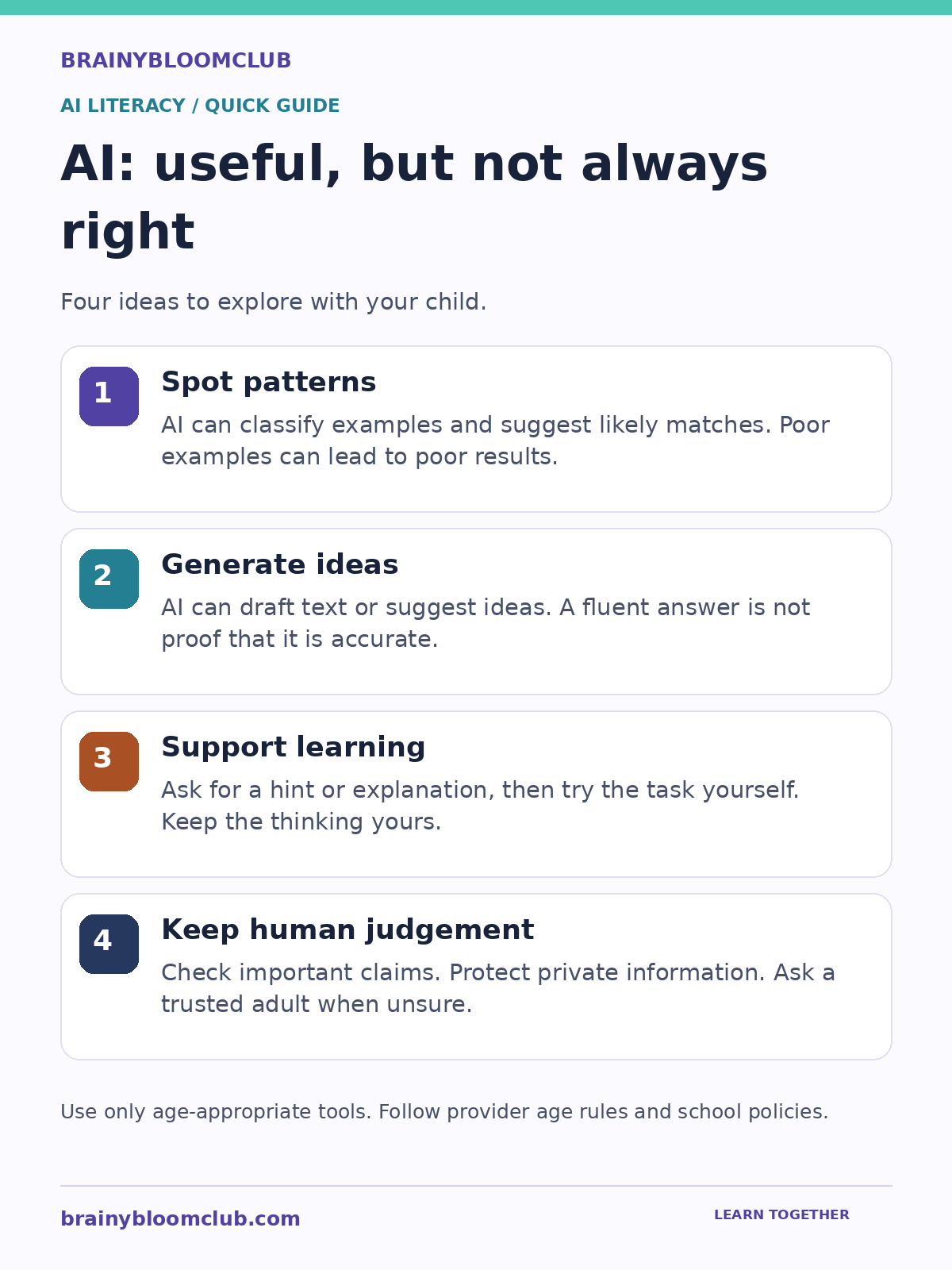
Four AI literacy reminders: spot patterns, generate ideas, support learning, and keep human judgement.
AI capabilities and limits. Original BrainyBloomClub graphic. Select the image to view full size.

Graphic summary: AI can spot patterns and generate ideas, but its answers can be wrong. Use it to support practice, verify important claims and protect private information.

At its core, AI works by processing large amounts of data, finding patterns and using those patterns to make predictions or decisions. Think of it like teaching a child to recognise animals. You show them hundreds of pictures of cats and dogs. Over time, they learn to tell the difference — not because someone gave them a rulebook, but because their brain spotted the patterns. AI does something similar, but with mathematics and code instead of neurons.

Machine Learning

Machine learning is a branch of AI where computers learn from experience. Instead of being programmed with every possible answer, a machine learning model is trained on examples and gradually gets better at its task. Spam filters, music recommendations and photo recognition all rely on machine learning.

Neural Networks

Neural networks are inspired by the human brain. They consist of layers of connected nodes that process information step by step. Deep learning uses neural networks with many layers to tackle complex problems like language translation, medical diagnosis and self-driving cars.

Natural Language Processing

Natural language processing (NLP) is the branch of AI that helps computers understand, interpret and generate human language. Chatbots, voice assistants and AI writing tools all use NLP. When your child asks a smart speaker a question and gets a spoken answer, NLP is doing the heavy lifting behind the scenes.

Computer Vision

Computer vision enables machines to interpret images and video. It powers facial recognition, augmented reality filters, medical imaging and quality control in factories. Kids who have used apps that identify plants or animals from a photo have already experienced computer vision firsthand.

Why Should Kids Learn About AI?

AI is not a distant future concept. It is shaping the world children are growing up in right now. Here are the most important reasons to introduce AI early:

  • Future-ready learning. AI is changing how people research, design and solve problems. Children need durable skills such as judgement, creativity and collaboration.
  • Critical thinking. Understanding how AI makes decisions helps children question information, recognise bias and think analytically.
  • Creativity. Generative AI tools let kids create art, music, stories and code — expanding what is possible for young creators.
  • Digital citizenship. Children who understand AI are better equipped to navigate deepfakes, algorithmic recommendations and data privacy.
  • Problem solving. AI projects teach kids to break big problems into smaller steps, test solutions and iterate — skills that transfer to every subject.

AI Concepts Every Child Should Know

You do not need a computer science degree to grasp the fundamentals. Here are the key AI concepts explained in plain language:

Algorithm

An algorithm is a step-by-step set of instructions for solving a problem. A recipe is an algorithm. A morning routine is an algorithm. In AI, algorithms are the mathematical recipes that process data and produce results.

Training Data

Training data is the information an AI model learns from. The quality and diversity of training data directly affects how well the AI performs. If you only train a model on pictures of golden retrievers, it will struggle to recognise a poodle.

Bias in AI

AI systems can inherit biases from their training data or from the people who build them. Teaching children about AI bias helps them become critical consumers of technology and future builders of fairer systems.

Prompt Engineering

Prompt engineering is the skill of writing clear, specific instructions for AI tools to get the best possible output. It is one of the most practical AI skills children can develop today, useful across writing, art, coding and research.

Generative AI

Generative AI creates new content — text, images, music, video or code — based on patterns it has learned. Tools like ChatGPT, DALL-E and Suno are examples. Children can use these tools creatively while learning the principles behind them.

Best AI Tools for Kids in 2026

These tools are safe, educational and designed with young learners in mind:

Google Teachable Machine

A free, browser-based tool that lets kids train their own machine learning models using images, sounds or poses. No coding required. Children can build a model that recognises hand gestures, facial expressions or objects in minutes.

Scratch + AI Extensions

MIT’s Scratch platform now supports AI extensions that let kids add image recognition, text classification and speech recognition to their projects. It is the perfect bridge between visual coding and AI concepts.

Machine Learning for Kids

Created by IBM engineer Dale Lane, this free platform guides children through building AI projects step by step. Kids train models, test them and use them in Scratch or Python projects.

ChatGPT with age-appropriate protections and adult guidance

ChatGPT provides a teen experience with additional safeguards and parental controls. Families should review the current parent resources, eligibility rules and privacy settings. Use it to ask questions, practise explanations and critique ideas, not as a substitute for learning or trusted human support.

Pictoblox

A Scratch-based coding platform with built-in AI and robotics capabilities. Kids can build face detection apps, voice-controlled robots and gesture-recognition games using drag-and-drop blocks.

Hands-On AI Projects for Kids

The best way to learn AI is by building. Here are project ideas organised by age group:

Ages 5 to 8: AI Without a Screen

  • Sorting games. Give children a pile of objects and ask them to sort by colour, size or shape. Discuss how this is similar to how AI classifies data.
  • 20 Questions with a twist. Play 20 Questions and explain that AI uses a similar process of elimination to make predictions.
  • Draw a robot friend. Ask children to design a robot that solves a real problem. Discuss what data the robot would need and what decisions it would make.

Ages 9 to 12: First AI Projects

  • Teachable Machine image classifier. Train a model to recognise different types of fruit, pets or hand signals.
  • Scratch chatbot. Build a simple chatbot in Scratch that responds to user input with pre-programmed answers, then upgrade it with AI text classification.
  • AI art generator. Use age-appropriate generative AI tools to create original artwork, then discuss how the AI learned to create images.

Ages 13 and Up: Intermediate AI

  • Python sentiment analyser. Write a Python script that analyses the mood of movie reviews or social media posts.
  • Custom AI assistant. Use an API to build a personal study assistant that answers questions about a specific subject.
  • AI ethics debate. Research a real-world AI ethics case (facial recognition in schools, AI-generated homework, deepfakes) and present arguments for and against.

AI Safety and Ethics for Young Learners

Teaching AI without discussing safety and ethics is incomplete. Children need to understand:

  • AI can be wrong. AI models hallucinate — they generate confident-sounding answers that are factually incorrect. Children must learn to verify AI outputs.
  • Privacy matters. AI tools collect data. Children should never share personal information, photos or location data with AI platforms without parental guidance.
  • Bias is real. AI systems can reflect and amplify societal biases. Discussing this openly helps children become responsible future builders.
  • AI is a tool, not a replacement. AI should enhance learning, not replace thinking. Children should use AI to explore, create and iterate — not to avoid doing the work.

AI Career Paths for the Next Generation

Children who build AI literacy today will have access to some of the most exciting and impactful careers of the future:

  • AI Engineer. Designs, builds and deploys AI systems for companies and organisations.
  • Machine Learning Researcher. Pushes the boundaries of what AI can do through academic and industrial research.
  • Prompt Engineer. Crafts effective prompts for generative AI systems — one of the fastest-growing new roles.
  • AI Ethics Officer. Ensures AI systems are fair, transparent and aligned with human values.
  • Robotics Engineer. Combines AI with physical hardware to build robots for healthcare, manufacturing, exploration and more.
  • Data Scientist. Analyses complex datasets to uncover insights and build predictive models.
  • AI Product Manager. Guides the development of AI-powered products from concept to launch.
  • Computer Vision Specialist. Builds systems that interpret visual information for medical imaging, autonomous vehicles and security.

How Parents Can Support AI Learning at Home

You do not need to be a tech expert to help your child explore AI. Here is a practical roadmap:

  1. Start conversations. Ask your child what they think AI is. Discuss AI they already use — voice assistants, recommendation algorithms, autocorrect.
  2. Explore together. Try tools like Google Teachable Machine or Machine Learning for Kids as a family activity.
  3. Set boundaries. Establish clear rules for AI tool usage, especially around data sharing and screen time.
  4. Encourage questions. When your child uses an AI tool, ask: How do you think it knew that? Could it be wrong? What data did it need?
  5. Connect AI to interests. If your child loves art, explore AI art generators. If they love sports, look at how AI is used in performance analysis. AI touches every field.
  6. Build a portfolio. Encourage your child to save their AI projects. A portfolio of AI experiments is increasingly impressive for school applications and future opportunities.

Frequently Asked Questions

What age should kids start learning about AI?

Children as young as five can begin exploring AI concepts through unplugged activities and simple sorting games. Screen-based AI tools like Teachable Machine are suitable from around age eight. Python-based AI projects work well from age twelve onward.

Is AI safe for children?

AI tools designed for education are generally safe when used with parental guidance. The key risks involve data privacy, exposure to inaccurate information and over-reliance on AI for schoolwork. Setting clear boundaries and maintaining open conversations about AI limitations keeps children safe.

Do kids need to know coding to learn AI?

No. Many AI learning platforms use visual, drag-and-drop interfaces that require no coding experience. However, children who learn Python alongside AI concepts will unlock more advanced projects and deeper understanding.

What is the best programming language for AI?

Python is the most widely used language in AI and machine learning. It has a gentle learning curve, massive community support and powerful AI libraries. For younger children, Scratch with AI extensions is an excellent starting point.

Will AI replace human jobs?

AI will transform jobs rather than simply eliminate them. Routine tasks will be automated, but new roles will emerge that require human creativity, empathy, judgement and collaboration with AI systems. Children who understand AI will be best positioned to thrive in this evolving landscape.

Start Your Child’s AI Journey Today

Artificial intelligence is not just for engineers and scientists. It is a foundational skill for every child growing up in the 2020s and beyond. The best time to start is now — and you do not need expensive courses or equipment. A curious mind, a browser and a willingness to experiment are all it takes.

Explore more on BrainyBloomClub: browse our Artificial Intelligence hub for the latest AI news, tools, projects and career guides — all designed for kids, parents and educators.

Sources and Further Reading

BrainyBloomClub reviews child-facing technology guidance against current provider information and established child-safety resources. Last reviewed: August 2026.

Next step: Explore the Artificial Intelligence hub, Digital Safety hub or STEM Projects hub for related age-guided resources.